
Building a Custom GPT for Meeting Minutes
- Mar 27
- 5 min read
By Paul Shotton, Advocacy Strategy
The real value of ChatGPT is not in better prompts. It is in structuring recurring tasks so the tool supports them reliably.
This article takes one common example — meeting minutes — and walks through how to build a custom GPT around it: what documents you need, how to sequence the instructions, and how to turn it into something your whole team uses consistently.
If someone on your team is already experimenting with this, good. This article will help you take it further. If nobody is, it is a practical place to start.
The case for moving beyond ad hoc use
Recurring tasks are everywhere in public affairs work — reports, briefings, meeting notes, policy summaries, position papers, stakeholder Q&As. In all of them, the challenge is not just writing. It is structuring information under time pressure and producing something others can actually use.
That is exactly where a well-designed GPT earns its place. Not as a shortcut, but as a reliable layer in a workflow that already exists.
Meeting minutes are a good entry point. The task is familiar, the workflow is already there, and the gap between what gets produced and what actually gets circulated is one most practitioners know well.
Why minutes are harder than they look
Most teams already have a process. Meetings are recorded. Transcripts are generated via Teams or Otter. Sometimes you get an auto-summary or an action list.
But the output is rarely good enough to circulate.
Transcripts are noisy and literal. Names are misheard. Project titles and policy file references come out wrong. Decisions are buried in discussion. Working from a full transcript requires judgment — and that applies to ChatGPT as much as it does to a junior team member doing it manually.
The task is not summarising. It is interpreting, structuring, and clarifying what actually happened. Done well, a custom GPT can do a significant portion of that reliably — saving time, improving consistency, and reducing the back-and-forth that comes from unclear action points.
There is also an upstream point worth making. Better meeting discipline produces better outputs. If actions are stated clearly during the meeting — what, who, when — both transcription tools and the GPT will extract them more accurately. A small behavioural shift with a compounding return.
The workflow you are actually designing
The surface process looks simple: agenda → meeting → transcript → minutes.
The real work sits between the transcript and the final output. That is where things break down — important points lost, names wrong, actions vague, structure that does not reflect what the meeting actually covered.
If you ask ChatGPT to "write minutes from this transcript," you will reproduce those problems at speed.
The better approach is staged:
Review the material and identify errors or ambiguities
Establish context from previous meetings
Draft the minutes
This mirrors good professional judgment. It also reflects how the tool performs best — when too much is asked at once, quality drops. Breaking the task into stages keeps it focused and gives you control at each step.
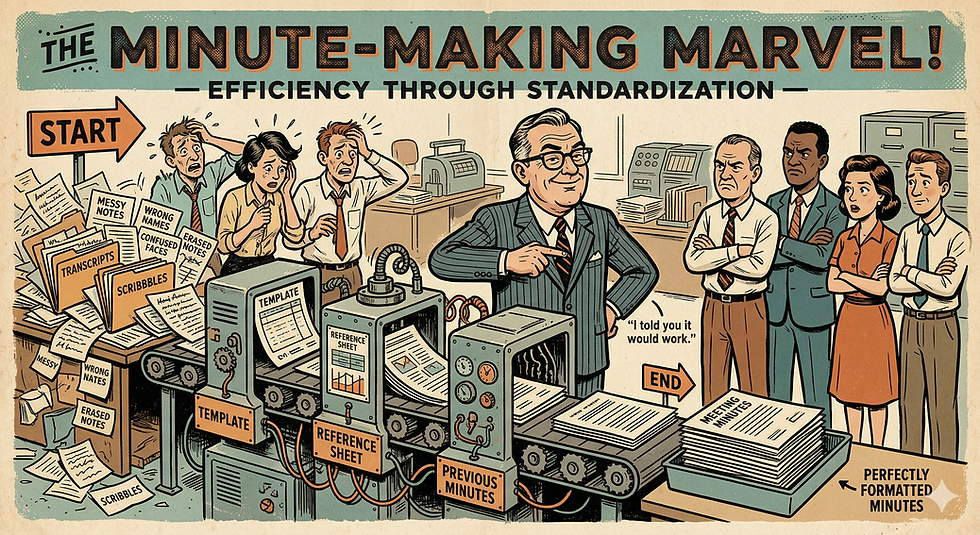
Three documents that do most of the work
A well-designed GPT depends less on clever prompts and more on the right supporting material. In practice, three documents matter most.
A template defines the structure of the output. It sets expectations and ensures consistency across every set of minutes, regardless of who runs the process.
Previous minutes provide continuity. Without them, the GPT has no thread to follow — no sense of what was agreed last time, what is still open, or what the relationship context is.
A reference sheet captures names, project titles, client references, policy files, and key terminology. This is the most underrated of the three. Transcription tools mishear things constantly. A reference sheet corrects that before it becomes an error in the record.
The design principle is straightforward: separate stable inputs from variable inputs. The template and reference material are stable. The transcript and meeting content change each time. Get this separation right and the rest follows.
Designing the instructions: sequence is everything
Once the documents are in place, the next step is defining how the GPT behaves — and the single most important decision is sequencing.
Do not ask it to do everything at once. Build a sequence that mirrors how a careful person would approach the task:
Review the transcript → identify errors and ambiguities → ask for confirmation before proceeding
Review previous minutes → establish context
Draft the minutes using the template
Offer output formats as needed — email summary, full document, slide-ready version
At each stage the GPT pauses, checks, and waits for input. This makes the interaction predictable. It also means a team member with no technical background can run it reliably.
Keep the instructions simple. Redundant instructions reduce clarity. If the workflow is well-defined, the instructions do not need to compensate for that.
Building it: less complex than it sounds
With the workflow defined, the setup is straightforward.
Create the GPT. Give it a clear name. Upload the stable documents — template, reference sheet, any standard supporting material. Write the step-by-step instructions. Set a simple trigger to start the process, something as minimal as "Type 'Start'."
At this point you are not writing a prompt. You are building a small system around a task your team already does.
For this use case, no external data connections are needed. Keeping the GPT focused on the provided material improves reliability and makes it easier to maintain.
Test it, break it, improve it
It will not work perfectly first time. That is expected, not a problem.
A simple approach: run two windows in parallel — one for the GPT setup, one for testing. Run the workflow. Note where it fails. Adjust the instructions. Run it again.
One useful shortcut: use ChatGPT itself to help refine the instructions. Describe what is not working, ask it to suggest improvements, iterate. In many cases the same conversation used to build the GPT can be used to improve it. The tool helps you build the tool.
Avoid the temptation to add more instructions when something goes wrong. More often than not, the problem is a lack of clarity, not a lack of instruction.
Make it a team asset, not an individual experiment
This is the step that matters most.
Once it works, share it. Make it available across the team. Brief people on the workflow behind it — not just the tool itself. A short internal session, even thirty minutes, makes a significant difference to adoption. People use things they understand.
Some on your team may already be experimenting with ChatGPT in their own way. This is a good opportunity to surface that, build on it, and move from individual experimentation to something the team owns collectively.
A practical suggestion: schedule a session in the next few weeks with the explicit goal of testing this together. Pick one recent meeting. Run the workflow. See what comes out. The point is not a perfect result on the first attempt — it is to make the experiment a shared one.
That is what embedding AI into public affairs work actually looks like. Not a tool that individuals use occasionally, but a workflow the team runs reliably.


Comments